 Riff Locker
Whisper Mode
It listens so you don't have to remember to press record.
Most lost riffs die the same way: you were playing, not recording, and by the time you reached for the phone the idea had moved on. Whisper Mode runs while you play and captures the passages that sound like live music.
Four stages, all on your phone
Listens
Short frames of microphone audio are scored for tone, harmonic content, brightness and sustain.
Qualifies
Sustained, harmonic playing scores high. Conversation, room noise and produced recordings coming out of a speaker score low.
Captures
When confidence stays high for a moment it starts recording, with three seconds of pre-roll so the first notes are kept.
Stops and notifies
After the silence window it saves the take as "Needs review" and sends a notification. Nothing is analyzed until you open it.
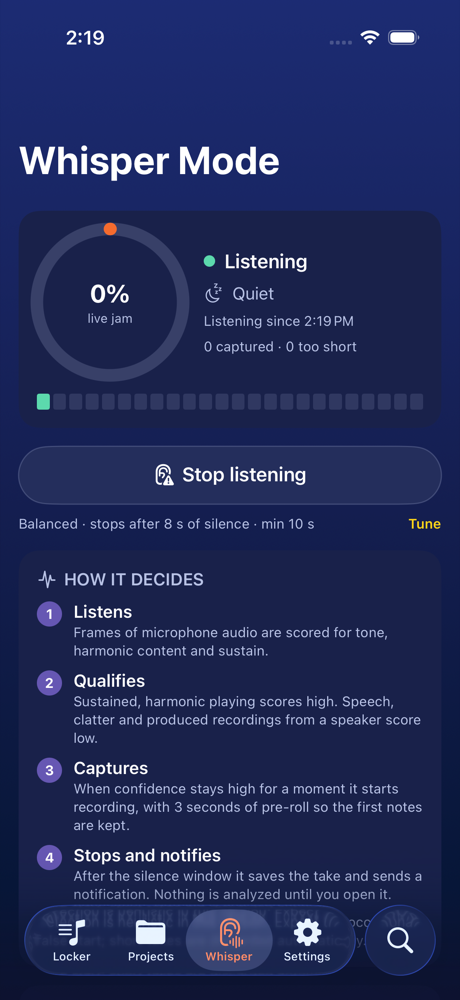
How it decides
Whisper Mode does not try to recognise songs or transcribe anything. It answers one narrow question, many times a second: does this sound like someone playing an instrument live in this room?
- Musicality rises with tonal, harmonic, sustained sound and falls for speech-like signals whose brightness jumps around.
- Liveness falls when the signal looks like a produced recording: lots of sub-bass and "air" at the same time, and a level that barely moves because the track was mastered with compression.
- Confidence combines the two and is smoothed so a single loud strum doesn't start a take and a single quiet bar doesn't end one.
- The segmenter waits for confidence to stay above the start threshold for one to two and a half seconds, keeps recording while it stays above a lower stop threshold, and ends the take after your chosen silence window.
What you control
| Setting | Default | What it changes |
|---|---|---|
| Sensitivity | Balanced | Conservative needs a clearly sustained signal; eager catches quieter passages with more false starts. |
| Stop after silence | 8 seconds | How long a pause ends the take. Raise it for music with long rests. |
| Ignore takes shorter than | 10 seconds | Anything shorter is discarded without bothering you. |
| Maximum take length | 20 minutes | A safety cap for long rehearsals. |
| Keep listening in background | Off | Lets Whisper Mode run with the screen off. Uses more battery; iOS shows the orange microphone indicator. |
| Notify when a session is captured | On | Local notification that opens the review screen. |
Reviewing a capture
Every capture lands in a review queue at the top of your locker. From the review screen you can listen, rename, keep, attach it to a song, export it, run analytics, or discard it. Discarding deletes the audio immediately.
Where it falls short today
- A solo instrument played through a hi-fi speaker can pass as live playing.
- A heavily compressed amp sound with a lot of low end can look "produced" and score low.
- Sustained singing counts as music. Talking usually doesn't, but sung speech is a grey area.
- A long pause splits one jam into two takes.
- Very quiet fingerpicking across a room may sit under the noise floor; try the eager setting or move the phone closer.
Field feedback from real rooms is what tunes the thresholds. If Whisper Mode misses or mis-fires for you, send us the details.
Privacy
Audio that does not qualify is never written to disk; the three-second pre-roll lives in memory only. Captured takes are ordinary riffs you can delete at any time. Nothing, not audio and not the numbers derived from it, leaves the device. See the privacy policy.